
How to Find Your Device Model Number
Device Help Guide
How to Find Your Device Model Number
Before booking a repair, it helps to know the exact model of your device. Different phones, tablets, watches, and laptops use different screens, batteries, charging ports, keyboards, and internal parts. Follow the simple steps below to find your iPhone, iPad, Apple Watch, MacBook, laptop, Samsung, Google Pixel, OnePlus, ASUS, Huawei, BlackBerry, and Microsoft Surface model number.
Apple Devices
How to Find Your iPhone Model
- Open Settings
- Tap General
- Tap About
- Check Model Name
Examples: iPhone 11, iPhone 12, iPhone 13 Pro, iPhone 14 Pro Max, iPhone 15 Pro.
How to Find Your iPad Model
- Turn your iPad over
- Look at the small text printed on the back
- Find the model number starting with A
- You can also check it in Settings ? General ? About
Examples: iPad 10th generation, iPad Air 5, iPad Pro 12.9-inch, iPad mini 6, A2696.
How to Find Your Apple Watch Model
- Turn your Apple Watch over
- Look at the text printed around the back sensor
- Find the model number or series details engraved on the back
- You can also check it in the Watch app ? General ? About on your iPhone
Examples: Apple Watch Series 7, Series 8, Series 9, Apple Watch SE, Apple Watch Ultra.
How to Find Your MacBook Model
- Click the Apple menu ?
- Select About This Mac
- Check the Mac model name and serial number
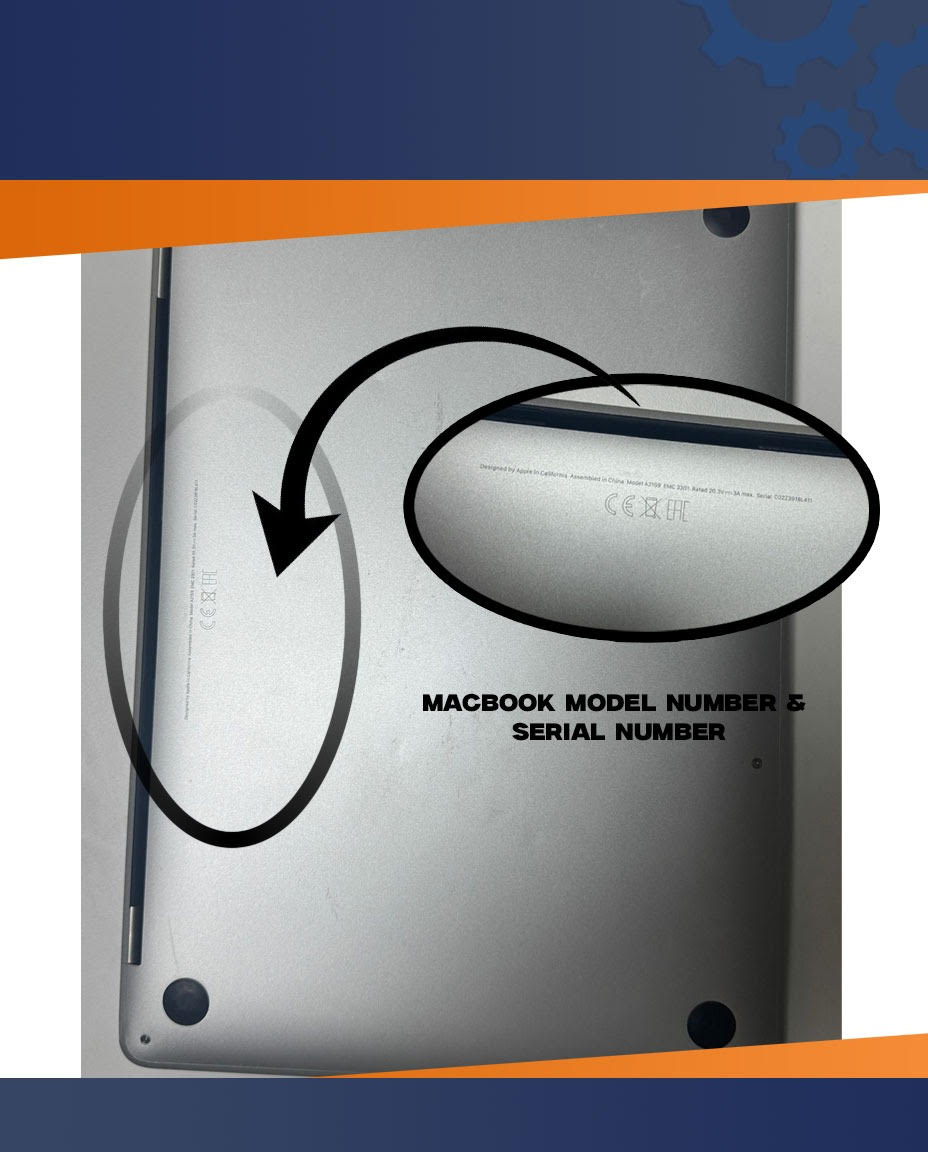
- You can also turn it over and check the bottom of the MacBook for the model number
Examples: MacBook Air A2337, MacBook Air A2681, MacBook Pro 14-inch A2779.
Android Phones
How to Find Your Samsung Galaxy Phone Model
- Open Settings
- Tap About phone
- Check the Model name and Model number
- You can also look at the small text printed on the back of the phone or the retail box
Examples: Samsung Galaxy S21, Galaxy S22 Ultra, Galaxy S23, Galaxy S24, SM-G991B.
How to Find Your Google Pixel Model
- Open Settings
- Tap About phone
- Check the Model name and Model number
- You can also check the model information printed on the back of the phone
Examples: Google Pixel 6, Pixel 7 Pro, Pixel 8, Pixel 8 Pro.
How to Find Your OnePlus Phone Model
- Open Settings
- Tap About device or About phone
- Check the Model name and Model number
- You can also look at the model number printed on the back of the phone or the retail box
Examples: OnePlus 9, OnePlus 10 Pro, OnePlus 11, OnePlus 12.
How to Find Your ASUS Phone Model
- Open Settings
- Tap About phone
- Check the Model name and Model number
- You can also look at the small text printed on the back of the phone or the retail box
Examples: ASUS ROG Phone 5, ASUS ROG Phone 6, ASUS Zenfone 8, ASUS Zenfone 9.
How to Find Your Huawei Phone Model
- Open Settings
- Tap About phone
- Check the Device name, Model, or Model number
- You can also look at the small text printed on the back of the phone or the retail box
Examples: Huawei P30 Pro, Huawei P40 Pro, Huawei Mate 40 Pro.
How to Find Your BlackBerry Phone Model
- Open Settings
- Tap About phone or About device
- Check the Model name and Model number
- You can also look at the label on the back of the phone, under the SIM tray, or on the retail box
Examples: BlackBerry KEYone, BlackBerry KEY2, BlackBerry Priv.
Computers & Laptops
How to Find Your Laptop Model
- Turn your laptop upside down
- Look for the manufacturer label or sticker on the bottom panel
- Check the model number, product name, or serial number
- Some laptops also show the model inside Settings ? System ? About
Examples: HP Pavilion 15, Dell Inspiron 14, Lenovo ThinkPad T14, ASUS Vivobook.
Microsoft Surface
How to Find Your Surface Pro Model
- Turn your Surface Pro over
- Look on the back case near the lower edge
- Find the model number or serial number printed on the device
- You can also check it in Settings ? System ? About
Examples: Surface Pro 7, Surface Pro 8, Surface Pro 9, Model 1796.
How to Find Your Surface Laptop Model
- Turn your Surface Laptop upside down
- Look at the bottom of the laptop
- Check the model number or serial number printed on the device
- You can also open Settings ? System ? About
Examples: Surface Laptop 3, Surface Laptop 4, Surface Laptop 5, Surface Laptop Go.
Need Help Repairing Your Device?
Once you find your model number, our team can confirm the correct parts and repair options for your device. Whether you need screen replacement, battery replacement, charging port repair, water damage repair, or board-level diagnosis, we can help.
Frequently Asked Questions
Why do I need my device model number before repair?
Your exact model helps identify the correct replacement parts, pricing, and repair method. Many devices look similar but use different screens, batteries, connectors, and internal layouts.
Can I find the model number without turning on the device?
Yes. Many devices have the model number printed on the back, bottom, or body of the device. You can also check the original box in many cases.
What if the model number is not readable?
If the text is damaged or faded, contact our support team with photos of the device. We can often identify the model by design, size, camera layout, or serial details.